What is FastExcel V5?
- FastExcel V5 is a family
of Excel addins to help you speed up, maintain and cleanup your
workbooks.
- FastExcel for Windows has 3 main
components:
- FastExcel V5 Profiler:
Profiling tools to find and measure VBA and calculation bottlenecks in your workbooks. Additional Calculation Modes and timing tools to help you calculate only the minimum required
- FastExcel V5 Manager: Formula Explorer, Workbook Cleaner and Name Manager tools to help you develop, debug, manage and maintain your workbooks.
- FastExcel V5 SpeedTools: 100 high-performance multi-threaded functions to speed up your workbooks.
- FastExcel Manager Pro for Mac Office 365
I have FastExcel V3 or V4 - what are my options?
FastExcel V3 is no longer supported or for sale.
FastExcel V4 is no longer for sale but will be supported until December 31 2027.
Can I install FastExcel V4 at the same time as FastExcel V5?
This is not recommended. Profiler and Manager have been designed to coexist but this scenario has not been extensively tested. Coexisting V4 and V5 SpeedTools could cause problems because the names of many of the SpeedTools functions are the same across both versions.
Help! The FastExcel licensing wizard says I have used up all my activations.
- Each activation is tied to the name of the PC.
If you reinstall the operating system or change the name of your PC you should first release the FastExcel license (Excel->FastExcel->Licenses->Release These Licenses).
But if you did not release the license before reinstalling or changing the name you can use our FastExcel Licensing Help Webpage to manage your activations
Managing your License Activations
You can manage your license activations using the FastExcel Licensing webpage:https://quicklicensemanager.com/decisionmodels/QlmCustomerSite/
The webpage allows you to:
- Get information about the PCs your license is activated on.
- Activate and Deactivate a License remotely.
What are the individually licensable products in the FastExcel V5
family?
- FastExcel V5 for Windows:
- Profiler: Profiling tools to find and measure calculation and VBA bottlenecks in
your workbooks. Provides additional timing tools to time calculation of individual ranges and worksheets.
- Manager Pro: Formula Explorer 6, Workbook Cleaner and Name Manager tools to help you develop, debug, manage and maintain your workbooks.
- SpeedTools: A family of high-performance high-function functions to speed up your calculation bottlenecks and extended Excel calculation modes to restrict calculation to the workbook components you choose.
- Formula Explorer 6: a Subset of Manager Pro. You can purchase it separately from FastExcel V5 but it is already included in Manager Pro
- Lambda Explorer 6: The free entry-level version of Formula Explorer Pro.
I don't need to use FastExcel Profiler every time I start Excel - how do I stop it loading?
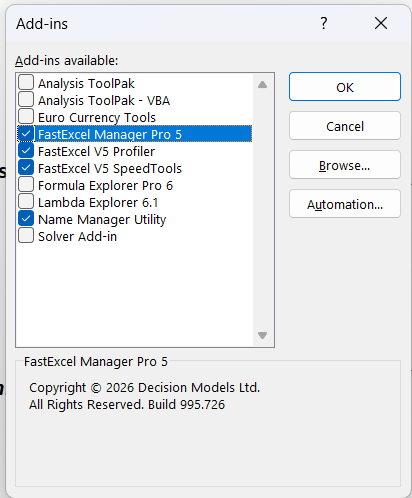
You can use the FastExcel Addin Manager to switch off Profiler (or the other FastExcel Products
Excel-->File-->Options-->Addins-->Excel Addins-->Go
Or add the Developer Tab to the Ribbon and click Excel addins
What bundled combinations of FastExcel V5 products can I buy?
The FastExcel V5 Bundle contains Profiler V5, Manager Pro V5 and SpeedTools V5
Formula Explorer Pro 6 is included in Manager Pro V5.
If I use FastExcel V5 to develop/change a workbook, will it work on a PC without FastExcel V5 installed?
- Yes, unless you have used the SpeedTools additional high-performance functions (TOTALS, SLICES, AVLOOKUP2, MEMMATCH, FILTER.IFS etc), in which case you will need to have SpeedTools installed.
- The additional calculation modes will also not be available unless you have FastExcel SpeedTools installed, but the workbook will revert to the standard Excel calculation modes.
What Versions of Excel does FastExcel V5 support?
- For Windows: Excel 2021 and Office 365 in both 32-bit and 64-bit versions.
- For Macintosh: Excel 365
Will FastExcel V5 work when I upgrade to the latest version of Excel?
- You should reinstall FastExcel V5 after you have upgraded.
What Operating Systems does FastExcel V5 support?
- Any Microsoft® Windows version that supports one of the required Excel versions.
- FastExcel V5 has been tested with Windows 10 and Windows 11.
- FastExcel V5 supports 32-bit Excel with both 32-bit and 64-bit Windows, and 64-bit Excel with 64-bit Windows.
- Mac operating systems are only supported for FastExcel Manager Pro for Mac Excel 365.
What is the latest version of FastExcel V5?
- The latest version of
FastExcel V5 is build 825 for Profiler, build 996.736 for Manager Pro and build 488.454 for SpeedTools
- There is a one-time upgrade offer for holders of a valid FastExcel V3 and V4 license.
- All V5 license holders can download and reinstall the latest build of FastExcel V5.
How much does FastExcel V5 cost?
- There are a wide range of licenses available: see here for details.
- There are substantial discounts for multiple licenses: see here for details.
What is the 30-day money-back guarantee?
- If FastExcel V5 does not perform substantially as described on this website and in the FastExcel V5 documentation we will refund your purchase price in
full if notified within 30 days of Purchase. Terms and Conditions apply.
How do I know what the price is in Japanese Yen or Australian Dollars?
- Prices are set in 3 base currencies: USD, GBP and EUR. The price in other currencies is calculated from the base USD price using FastSpring exchange
rates. Before you confirm your purchase you will see the price in your chosen currency.
Is there any other way of buying FastExcel V5 other than online by credit card?
- To keep prices and administration costs as low as possible the preferred method of purchasing FastExcel is online using a credit card. After the purchase has completed you will be e-mailed a receipt. Corporate customers usually purchase using this method and claim using personal expenses if they have
used their own card.
- For purchases over £200 or $300 (or equivalent in other currencies) we also accept Purchase Orders from recognised companies, but license shipment only occurs after payment has completed.
What do I get when I buy FastExcel V5?
- You get one or more license activation codes to use with the downloaded install package.
What does the download Install package contain?
- The FastExcel V5 programs.
- The Help files for FastExcel V5.
- Manuals in Adobe Acrobat PDF format for FastExcel V5
- A copy of the end-user license.
- The Readme file
How do I install FastExcel V5?
- FastExcel V5 has two types of Installers - Automatic or Manual.
- For Automatic - Doubleclick the downloaded nstall package and follow the instructions from the installation wizard. See Installing FastExcel for details of the installation options and using the FastExcel
Uninstaller.
- For Manual - Extract the contents of the zip file to a folder and then use the Excel Addin Manager to load the XLAM files. See Installing FastExcel for details of the installation options.
How do I get FastExcel V5 revision and fixes?
- Revisions and fixes to Version 5 of FastExcel will be available for download from this site at no additional charge to holders of a valid and current FastExcel V5 license.
What support do you provide for FastExcel?
Does FastExcel V5 modify the Windows Registry?
- There are 2 types of installer available for FastExcel V5
- The FastExcel automatic installers for Windows require Administrative privileges to be able to install FastExcel and make changes to the Windows registry
- The FastExcel manual installers for both Windows and Mac do NOT require Administrative privileges to be able to install FastExcel, but require additional steps using the Excel Addin Manager
Where can I find out more about FastExcel?
View the FastExcel V5 WebHelp
User Guides in PDF Format are installed in the 3 sub-folders of the FastExcel V5 Install folder (usually C:\Program Files (x86)\FastExcelV5)
Help! I have lost/can't find my license code/installation password or
My license code e-mail never arrived.
Check the e-mail we sent to your e-mail address. If you still can't find it send an e-mail
to Charles@Decisionmodels.com, containing:
- The e-mail address you gave when purchasing.
- Your name.
- Company Name.
- Date of Purchase.
- Currency used for Purchase.
When we have verified that the purchase took place we will e-mail you the license code again.
Help! The download of FastExcel failed or did not complete.
- Try downloading the FastExcel install package again.
How long will it take to download the FastExcel Install package?
- The package is about 30 MB.
- Download time depends on the speed of your Internet Connection and the load on the Internet.
What are the terms and conditions of the FastExcel User License?
I do not have Acrobat Reader installed. Where can I get it?
You can download the latest version of Acrobat Reader free from Adobe.
|